Monday, May 28, 2007

Purchasing new Adsense products

There is so many Adsense packages, memberships flying about that it’s really hard to make a decision on what to buy. Unless of course time and money is not a problem for you. When choosing these current “hot” offers, there are several things I look at before typing my credit card information into the order form.

Here’s my checklist. Enjoy

1. Read the sales letter. Make a list of the features it has.

2. Compare the features of the product to the existing ones which you may already have. Does it really provide something which you don’t have.

3. With the list of features jotted down, imagine what you can do with it and when you can use it. If you find that you won’t have time to use the membership or the features are similar to the products you have already, then stop. Don’t buy because it’s new and that it’s limited. There’s always a better product being produced.

4. Check the owner of the product. Are they well-known and respectable? If there are question marks then search the internet. You are bound to find some information on them if they have a rep

5. Take a note if other well-known internet marketers are promoting the same product. These maketers do not promote just anyone as they have a reputation to live up to. Therefore they won’t recommmend something they haven’t tried before.

6. Study the bonuses. Sometimes the bonuses are better than the actual product. If you find some bonuses that you need then get it just for the bonus. eg. A one hour business consultation by Mr. Famous Guru7. Read the sales letter and then leave it at the side for at least 2 days. If you still want to buy the product then go for it. A lot of the times we buy on impulse and regret it later

Read More......
Friday, May 25, 2007

Adsense Tips and Tricks

Well, there are so many adsense tips floating around. Still thought of compiling a list, from my own experience and from whatever I leaned from a lot of resources.
1. Adsense Heatmap
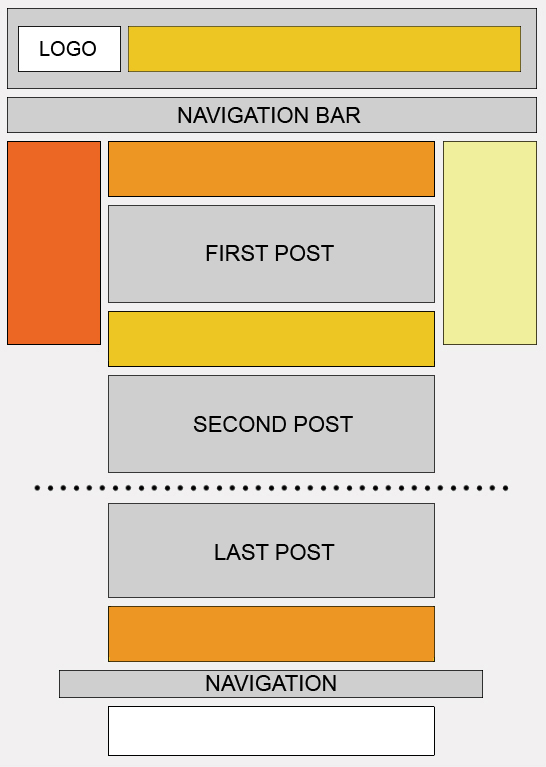
It may be told a number of times, but let me repeat - Adsense heatmap works!! I have increased CTR for a forum by almost 4 times by having ads just after the first post!
Here is the heatmap:https://www.google.com/adsense/images/placement
Heatmap for forum:
2. Use channels
Channels are great tools to track your performance. Use channels for each ad position and name them logically -"homepage-header-banner". Keep an eye on the performance over a period of time, say one week. Don't be afraid to experiment. Change the colors, blending, size and see which one perform best.
3. Section targeting
Are you not getting relevant ads on your site? Dont worry, you can use section targetting.Keep your most important text inside section targeting tags:Your text goes here.
4. Less is MoreAre you getting $0.03 clicks? Probably you are using too many ads on a single page. Even though google allow you to plance up to 3 ads on a page, better keep it to one or maximum two. That is the best way to make sure that your clicks get paid more. Make sure that the location where you get maximum clicks will be the first one to display ads. To make it clear, there should not be any ads above your best location, when you see the HTML source code.
5. Blend Your AdsBlending the ads to your site converts the best. You may opt for the same background color as the site, same text color etc.Another tip: Dark background colors and light fonts work best. For eg: Balck background and white text, for both your site content as well as ads. You may have a slightly different font color for ads(say yellow) to get noticed. It may not be easy on your visitors, but it converts well. if you are not expecting too many repeat visitors, this may be a good idea.

Read More......